Sure, there are lots of random password generators out there, but how many of them are integrated with our very feature-rich open source code repository of tools that will help you to code against Active Directory, while also standing alone as a simple quick to use tool for a helpdesk?
Yeah, that's right, only 1 random password generator tool does that. Get it and its open source code now: https://github.com/Securology/ActiveDirectoryServices/tree/master/PasswordGenerator
(noun) securology.
Latin: se cura logia
Literally translated: the study of being without care or worry
Friday, June 7, 2013
Thursday, June 6, 2013
Coding for Active Directory: Quickly import Exchange Rooms or Resources
Do you have a copy of Visual Studio, a very rudimentary knowledge of C# .NET, and a need to import a list of Exchange Rooms or Resources into your Active Directory?
If so, check out a couple very simple example apps that can import .CSV files to knock out this frequent task:
Labels:
active directory,
identity management,
open source
Wednesday, June 5, 2013
Coding for Active Directory: Programmatically Get or Set Obscure Attribute Data in C#
If you are an organization of any size, chances are you have an Active Directory instance sitting around, and maybe some level of additional investment in Microsoft products beyond Windows on client machines and a couple servers. And the more investment you have, the more value you will get from having relevant data in your Active Directory. You may even have some developers on staff that write applications in C# or VB .NET. Chances are, though, your developers won't understand or even want to understand Active Directory.
They may, however, be able and willing to code to a few random source code examples that float around on the web, but most examples are not very feature complete. So it requires developers digging into the musty underbelly layers of Active Directory to learn how to get what they need. Few will dig.
You could purchase an API, but the licenses may be expensive, and you may only want to read or set a couple of attributes on a user or group object that nobody else seems to have documented how to do well enough to satisfy your developers.
Or you could just send your developers to the new Securology GitHub repository to pull down a fully-functional, open source, non-restrictively licensed API to include in their projects to get up and going.
Maybe you just dealt with a large scale AD migration and you need to peel back the layers and extract user or group SIDs (Security Identifiers) or validate that SIDs from previous domains on imported objects are properly stored in the SID History?
Maybe you have a basic interface with your HR system, but don't want to shell out tons of cash to purchase a metadirectory tool like Identity Lifecycle Manager to move HR data like manager/reporting relationships around, but could really benefit from having that data in your Exchange, SharePoint or other application environments.
Maybe you need to set the user's employee number from your HR system on each AD user to identify the authoritative data source to satisfy an Active Directory Audit.
Maybe you just want to read or write the AD user's address, telephone, or even IP Phone number.
Maybe you have a mixed environment that also contains Unix servers and you need to set Unix attributes on the IT Unix Admin user accounts for a Unix SSO to AD product that you're using.
Maybe you'd like to programmatically setup Microsoft Exchange or Lync (Office Communicator) attributes?
Maybe you'd like a safer way to programmatically move or delete Active Directory objects?
Maybe you'd like an easier way to programmatically add or remove a user from an AD group? Or maybe check if they already are in that group?
Maybe you'd like to populate your AD with Contact objects for business partners who don't need user accounts in your domain or forest, but so that they'll still show up in the Global Address List (GAL)?
Maybe you need a way to programmatically create an Organizational Unit (OU)?
Maybe you'd like to toggle an AD group from "Security" to "Distribution" and back again? Or "domain local" to "universal"? Or dump all of its members? Or check if the AD group has no members? Or set the "owner" of the group for audit/management purposes?
Maybe you'd like to prune back old computer objects? Or build a report to show what Operating Systems are in your directory? Or safely move or delete computer objects?
Maybe you'd like a way to expose the True Last Logon time of a user account without manually checking each Domain Controller and comparing times? Or maybe you'd like a nice multi-threaded (and fast!) way of checking all Domain Controllers simultaneously?
If any of those are even remotely interesting to you, check out our extended version of Microsoft's System.DirectoryServices.AccountManagement namespace that we provide on GitHub.
They may, however, be able and willing to code to a few random source code examples that float around on the web, but most examples are not very feature complete. So it requires developers digging into the musty underbelly layers of Active Directory to learn how to get what they need. Few will dig.
You could purchase an API, but the licenses may be expensive, and you may only want to read or set a couple of attributes on a user or group object that nobody else seems to have documented how to do well enough to satisfy your developers.
Or you could just send your developers to the new Securology GitHub repository to pull down a fully-functional, open source, non-restrictively licensed API to include in their projects to get up and going.
Maybe you just dealt with a large scale AD migration and you need to peel back the layers and extract user or group SIDs (Security Identifiers) or validate that SIDs from previous domains on imported objects are properly stored in the SID History?
Maybe you have a basic interface with your HR system, but don't want to shell out tons of cash to purchase a metadirectory tool like Identity Lifecycle Manager to move HR data like manager/reporting relationships around, but could really benefit from having that data in your Exchange, SharePoint or other application environments.
Maybe you need to set the user's employee number from your HR system on each AD user to identify the authoritative data source to satisfy an Active Directory Audit.
Maybe you just want to read or write the AD user's address, telephone, or even IP Phone number.
Maybe you have a mixed environment that also contains Unix servers and you need to set Unix attributes on the IT Unix Admin user accounts for a Unix SSO to AD product that you're using.
Maybe you'd like to programmatically setup Microsoft Exchange or Lync (Office Communicator) attributes?
Maybe you'd like a safer way to programmatically move or delete Active Directory objects?
Maybe you'd like an easier way to programmatically add or remove a user from an AD group? Or maybe check if they already are in that group?
Maybe you'd like to populate your AD with Contact objects for business partners who don't need user accounts in your domain or forest, but so that they'll still show up in the Global Address List (GAL)?
Maybe you need a way to programmatically create an Organizational Unit (OU)?
Maybe you'd like to toggle an AD group from "Security" to "Distribution" and back again? Or "domain local" to "universal"? Or dump all of its members? Or check if the AD group has no members? Or set the "owner" of the group for audit/management purposes?
Maybe you'd like to prune back old computer objects? Or build a report to show what Operating Systems are in your directory? Or safely move or delete computer objects?
Maybe you'd like a way to expose the True Last Logon time of a user account without manually checking each Domain Controller and comparing times? Or maybe you'd like a nice multi-threaded (and fast!) way of checking all Domain Controllers simultaneously?
If any of those are even remotely interesting to you, check out our extended version of Microsoft's System.DirectoryServices.AccountManagement namespace that we provide on GitHub.
Tuesday, June 4, 2013
Coding for Active Directory: Proxying Users into an AD-LDS Application Directory
In another IT Pro tip related to Active Directory, suppose an organization has an internal AD forest, but has a company policy that only paid personnel are to have accounts in that directory. That's a fairly rational policy:
Under the hood, when an internal AD user connects to the application, an authentication request is passed to the AD-LDS, which looks up the UserID of the internal user, finds the User Proxy object, and then performs Kerberos authentication against the internal AD. All other attributes, though, from contact data fields, to the group memberships that the UserProxy has, are separate from the internal AD forest. In essence, nothing is automatically the same and it's yet-another-directory-to-manage.
- If we pay you directly, then you're an employee, so you get an account
- If we pay you indirectly, then you're a contractor that we've hired, so you can also get an account
- If you pay us, whether directly as a consumer, retailer, or reseller, or indirectly as a consumer through a retailer or reseller, then you're a customer, so you probably should not have an account in our internal AD forest.
But suppose you have an application that needs to be built that will allow both employees/contractors, AND customers to access it, and you don't want to setup yet-another-provisioning process for granting and revoking access for employees and contractors?
Enter a common solution: Active Directory - Lightweight Directory Services (previously known as ADAM, AD Application Mode, a.k.a. an "application" directory). This is a lightweight, LDAP only directory with less bells and whistles than AD has, but many Microsoft-centric applications can plumb right into it.
But to achieve a true Single Sign On for the internal AD users, the IT Admin must create either a UserProxy or a UserProxyFull object in the AD-LDS. Both function nearly the same, but a UserProxyFull has additional schema data elements for storing additional contact data fields, which are generally handy for today's applications.
Wouldn't it be nice if there was a way to build a service or application in C# .NET so that a configurable subsection of your organization's internal AD user community could automatically be provisioned and deprovisioned, complete with metadata updates, and maybe even rudimentary AD-LDS group memberships based on your AD data? Why yes, yes that would be very nice.
Wouldn't it be even nicer if the code was open source so we can take it, borrow it, and use it internally without a restrictive license? Why yes, yes that would be very nice, too.
Wouldn't be even nicer still if this article linked straight to that source code?
Why yes, yes it sure would be nice.
Good thing we just did!
Labels:
active directory,
identity management,
open source
Monday, June 3, 2013
Active Directory Tip: Hitting Snooze on the Password Expiration Policy
The Active Directory Password Expiration Snooze Button
- Dealing with service, application, or generic accounts and a strict constraint to not mark them as non-expiring (forever) passwords
- Dealing with rarely active human users who suddenly need to (on-demand) authenticate against an application, such as HR benefits open enrollment for employees who are not "information workers" (don't access computers).
There are a couple tricks for dealing with this without causing interruption. Take note that these "tricks" may completely circumvent the letter and perhaps even the intent of the "policy". But even with astute auditors, the intent of using these tricks will likely never get noticed.
Or perhaps you are an auditor, and reading the details of these tricks will open up your mind to look for new events that signify lack of compliance.
Administrative Password Resets
If you know the password for the account in question, then simply perform a password reset with that password. If you have never thought to do this before, this may at first seem counter-intuitive: after all, resetting a password with a password history rule turned on by policy will cause the password to change, right?
Wrong. There are two ways an Active Directory password can change:
- The user initiates a password change event, in which they are required to supply the current password in addition to a new password.
- The administrator with permissions on the UserAccountControl attribute of the AD user object can perform an administrative reset.
A reset by an administrator must support changing the password when the user is locked out and does not know the password, therefore, the administrator is not required to know the current password.
Also, a reset by an administrator does not enforce password history. If it did, a rogue administrator could inadvertently learn the current password if the new password supplied by the administrator failed to reset due to password history requirements. Sure, they just reset the password and could impersonate the user anyway, but that may not be the point: that user's password might be the same on a different (non-Active Directory integrated) application.
So, if you know the current password, perform a RESET and the password last set date attribute on the user account in the directory will update, effectively hitting the snooze button.
A More Clever Trick
But what if you don't know the current password for the account?
In the scenario of a mostly-inactive end user community that suddenly need to hit an application (e.g. your company's HR system for annual benefits enrollment):
- there may be too many users to learn their passwords
- asking the user for their password is likely faux pas
- the user may not even know the password anyway (since it's been a year), and
- resetting a large collection of users passwords to a standard/default that everyone shares is insecure
- and resetting individually unique passwords for an infrequent, on-demand access presents communication problems all of its own
So, what to do?
You could disable or extend password expiration. In Windows 2003 AD and earlier, this meant changing the policy for everybody, which may not be the intent at all. This is especially true if there are both active and inactive users in the directory, since active users will not get the normal "your password is about to expire" warning X days before it's too late. Reverting your password expiration policy setting back to the original value could result in a portion of your active users suddenly being locked out and calling for help. In Windows 2008 and later, you can have multiple expiration policies within a domain, but your user objects may not be grouped to distinguish the inactive users of concern. You could identify them and move them (and even script that step), but then you may have to move them back to many different OUs (Organizational Units) which could be just as much of a pain as the original problem.
Or you could follow this set of steps (which are scriptable!):
- In Active Directory Users and Computers, locate the user with the expiring or expired password
- Check the "force password change at next logon" box.
- Click Apply.
- Uncheck the "force password change at next logon" box.
- Click Apply.
And VOILA! That user's password expiration has just been snoozed-- effectively reset for another iteration, and with zero knowledge of the current password. The password last set date will appear to be the moment you hit step 5.
How does this work?
This can all be scripted out using the dsquery and dsmod commands the Microsoft ships with Active Directory. PowerShell could also be used. Or, an astute C# (or VB) .Net developer could simply take a look at the Securology GitHub repository, to see the example Password Snooze Button console app, to incorporate it into your organization's existing user management applications and services.
For the Auditor
To detect if an organization that you are auditing has been using the first option (administrative password resets to snooze the expiration), look for:
- Event log data for password resets of multiple accounts at roughly the same time, since this would likely be done "in mass" by the IT administrator
- Service accounts that all have roughly the same password last set date and time. Manually resetting multiple passwords would have a period of time between each reset event, but a script would cause them all to be within a few seconds of each other
- User accounts that have been in existence for longer than the password expiration policy's time out, but that have one or few historical passwords stored in the directory (requires a very low level AD editing tool to discover), while still being active (lots of log on events)
To detect if an organization has been using the second option (password must change flag), look for:
- Lots of user accounts with nearly the same date/time value for the password last set attribute.
- Lots of user accounts that have not logged in since their password was last set.
- If event log data is available, look for lots events denoting the must change password flag was set or unset.
Even if long term historical event log data is available, the determined IT administrator could spread out these events to appear sporadic, random, or intentionally related to a user's call to a help desk. A determined administrator could both keep the lights on and keep auditors at arms' length without detection of a policy violation.
Labels:
active directory,
identity management,
open source
Monday, May 13, 2013
Securology's Open Source Repository on GitHub
Securology now has open source code on GitHub!
https://github.com/Securology
This is something we have wanted to do for some time and finally are now able! As our contributors find the time and freedom to contribute some of our intellectual property back to the greater community at large, we will add more repositories and content there.
Our first offering is a C# .NET wrapper that can do more to manage Microsoft Active Directory instances (including Active Directory Lightweight Directory Services, formerly known as ADAM, or Active Directory Application Mode) than any other open source project can do (which is why we wrote it in the first place). Our open source Active Directory Services repo is available here:
https://github.com/Securology/ActiveDirectoryServices
In addition to shipping a core library that extends Microsoft's out-of-the-box functionality that ships with the .NET runtime (System.DirectoryServices.AccountManagement), we also have fully working example applications that are consumers of the library, so you can see how to use all of the features we have built.
Here's a list of just some of the features our consumer applications can do:
https://github.com/Securology
This is something we have wanted to do for some time and finally are now able! As our contributors find the time and freedom to contribute some of our intellectual property back to the greater community at large, we will add more repositories and content there.
Our first offering is a C# .NET wrapper that can do more to manage Microsoft Active Directory instances (including Active Directory Lightweight Directory Services, formerly known as ADAM, or Active Directory Application Mode) than any other open source project can do (which is why we wrote it in the first place). Our open source Active Directory Services repo is available here:
https://github.com/Securology/ActiveDirectoryServices
In addition to shipping a core library that extends Microsoft's out-of-the-box functionality that ships with the .NET runtime (System.DirectoryServices.AccountManagement), we also have fully working example applications that are consumers of the library, so you can see how to use all of the features we have built.
Here's a list of just some of the features our consumer applications can do:
- Create, Edit, Update, and Delete Active Directory objects Users, Groups, Organizational Units (OUs), Contacts, etc.
- Create, Edit, Update, and Delete AD-LDS (ADAM) UserProxy and UserProxyFull objects.
- Sync AD Users into an AD-LDS (ADAM) instance as UserProxy or UserProxyFull objects.
- Create, Update, Delete, and generally manage/sync dynamic AD security/distribution groups based upon reporting relationships (if those are defined within Active Directory).
- Enable, set, and maintain Microsoft Exchange attributes to enable objects to become visible in the GAL (Global Address List), which also works for Microsoft's Exchange Online hosted service via DirSync.
- Import various rooms and resources from a .CSV file into Active Directory and enable their visibility in the Exchange GAL.
- Enable and Manage Office Communicator/Lync attributes to turn on/off access to your company's Lync/OCS server, setup default policies, including access to any internet-facing proxy servers as well as archive/logging per user.
- Generate random passwords for users.
- A nifty way of "snoozing" when a AD user's password expires while keeping the same password.
- And much more...
Eventually, we will share a working Provisioning Web Service that will be a great solution for limited budget organizations that want some of the functionality Microsoft's Identity Lifecycle Manager (ILM) includes, without the heftier license cost and infrastructure requirements.
More follow-up posts will follow.
Tuesday, February 12, 2013
Breaking into Kaba Door Locks
This is an older issue that was resolved by an update from the manufacturer, but it's still an interesting story.
Continuing from yesterday, Marc Weber Tobias also was instrumental in getting Kaba to update their Simplex push-button mechanical combination locks. On those door locks, which have seen near ubiquitous deployment, a mechanical combination is entered into a push-button key pad, which unlocks the door. Some models include other features, like "bypass" which allows a person inside to egress through the door without pushing the combination. It's this feature on the Kaba lock that Tobias learned could be defeated with a rare earth magnet.
Here's a (slightly dry) walk through of how the lock is defeated using just a magnet, leaving no forensic evidence of unauthorized entry whatsoever:
One aspect of this story that will be interesting for computer security professionals is the element of "responsible disclosure" used by Tobias to attempt to force the hand of the manufacturer to fix the problem, followed by the manufacturer's all too familiar "there is no such problem" response (yet they did fix it).
Continuing from yesterday, Marc Weber Tobias also was instrumental in getting Kaba to update their Simplex push-button mechanical combination locks. On those door locks, which have seen near ubiquitous deployment, a mechanical combination is entered into a push-button key pad, which unlocks the door. Some models include other features, like "bypass" which allows a person inside to egress through the door without pushing the combination. It's this feature on the Kaba lock that Tobias learned could be defeated with a rare earth magnet.
Here's a (slightly dry) walk through of how the lock is defeated using just a magnet, leaving no forensic evidence of unauthorized entry whatsoever:
One aspect of this story that will be interesting for computer security professionals is the element of "responsible disclosure" used by Tobias to attempt to force the hand of the manufacturer to fix the problem, followed by the manufacturer's all too familiar "there is no such problem" response (yet they did fix it).
Monday, February 11, 2013
Breaking Physical Locks
Recently, Wired Magazine ran an article about just how easy it is for children to break into certain models of gun safes. Their findings are interesting, but not totally surprising. Watch for yourself if you haven't already seen it:
We did our own review of pistol safes here, but more or less comparing features of safes, not attempting to penetrate them as the article describes.
One of the researchers, Marc Weber Tobias, has a variety of other very interesting (but dry) videos describing physical lock security and some of the particular products that are defeated. His YouTube channel is worth a review.
We did our own review of pistol safes here, but more or less comparing features of safes, not attempting to penetrate them as the article describes.
One of the researchers, Marc Weber Tobias, has a variety of other very interesting (but dry) videos describing physical lock security and some of the particular products that are defeated. His YouTube channel is worth a review.
Friday, October 26, 2012
Sony's PS3 DRM Cracked
Anyone who pays any attention to DRM will extrapolate the general principle:
Sony just learned their DRM lesson (again). I'm sure that people at Sony already know this principle, but some "suit" tells the engineers to "do something about the problem" so they implement a technical speed bump. That's all it is and will ever be.
You can never prevent an end-user who has physical control of a device from breaking any DRM scheme you can invent.
Sony just learned their DRM lesson (again). I'm sure that people at Sony already know this principle, but some "suit" tells the engineers to "do something about the problem" so they implement a technical speed bump. That's all it is and will ever be.
Thursday, October 18, 2012
Skeleton Keys
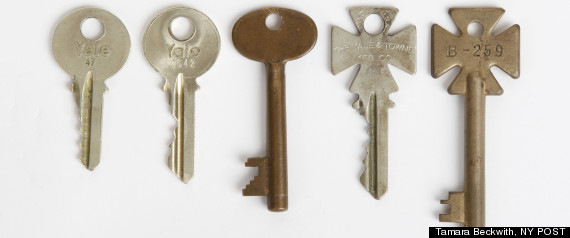
Wouldn't it be really scary if physical locks in large planned cities like NYC were designed to use skeleton keys-- master keys that are shared with do-gooder firefighters and locksmiths alike-- without ever thinking what could happen if such keys got into realm of the average Joe, whose do-gooder status was unknown? Yep it would.
Wouldn't it be even scarier if those who cried "the sky is falling, the sky is falling" also were dumb enough to post high res photos of the skeleton keys on their websites (pictured left) so that anyone with access to key blanks and tools could easily measure and create their own skeleton key copies? Again, yes.
| Look but don't pay attention to key teeth details! |
Labels:
key management,
Marketing FUD,
physical security
Saturday, October 13, 2012
Saturday, October 6, 2012
Finally a Safe Hello World
It's very common for Hello World example apps in textbooks or other educational literature to promote insecure software building practices right out of the gate. What a breath of fresh air to see the Microsoft MVC folks safely HTML encoding (to avoid XSS) in their MVC4 Hello World application!
Friday, October 5, 2012
Coping with Compromised Certificate Authorities
With the news containing stories of malware distributing via compromised Certificate Authorities, it makes sense that some IT Security blogs would address "what to do" if this happens to your CA. This blog post gets it wrong, though:
So a much more plausible option:
What would you do if you found out that the Certificate Authority that provides Digital Certificates to your company was compromised, and Microsoft was adding the Certificate Authority’s public key to Windows un-trusted Root Store? Well if you have not got a contingency plan to implement then I can presume you will be in a panic to purchase new certificates from another Certificate Authority... It can take Certificate Authority’s (CA’s) a few days to validate domain ownership and company registration details... While all this is happening your customers are getting a message from Internet Explorer that your SSL certificate is not to be trusted.
What can you do?Keep in mind that the worst-case scenario described above would require the Root CA Certificate to be compromised. Most Root CAs are offline certs, meaning the computers that house them are not powered on except during special circumstances when new intermediate CA certificates are generated, OR, they are online in an "air gap" (disconnected from the internet) network accessible only via sneakernet. Exploiting an offline CA is a big deal, and if it occurs it won't be just your organization that is affected, but likely a large part of the entire internet.
- Do not rely on one Certificate Authority for all of your certificates. You should have a relationship with at least two well known Certificate Authority’s and the CA’s should have validated all of your domains. This will let you quickly order Digital Certificates from the second CA without having to go through the company validation process...
- If you cannot tolerate any downtime for a service you can take the extra step in which you create backup certificates for each service using your backup Certificate Authority. This will enable you to implement the backup certificates without having to contact the second CA and joining the queue of company’s looking for new certificates.
So a much more plausible option:
- The CA will just create a new intermediate CA cert and re-issue client certs to all of its paying customers.
Labels:
crypto,
identity management,
key management,
Marketing FUD
Thursday, September 27, 2012
Vauban Star Fortifications
![]() |
| Bourtange Star Shaped Fort |
Acute angles on the corners of a building are added to the architectural design to eliminate "dead zones" in which an adversary could hide or take refuge. At the time of star shaped fortifications, all of the competing designs employed rounded towers or turrets at each corner, typically to house archers. As a breaching force approached the rounded corner, they were able to hide from the archers using the fortifications intended to be an asset in favor of the defenders.
Acute angles, however, prevented the breaching force from seeking shelter along the very walls intended to shelter the defenders. [See the illustration, below right.]
Modern applications against a well equipped modern adversary are very limited, since "air support" ruined traditional fort designs (adversaries can simply rain fire from above). However, against a low tech insurgency, the classic star design still prevails.
There are also applications for the acute corners in modern civil architecture.
For example, an HVT (High Value Target) person, such as a celebrity, bank CEO, or anyone else that might typically employ a Private Security Detail, these corners help to deter snatch-and-grab and similar attacks by simply limiting the avenues of approach. Col Jeff Cooper, famous for dealing with small arms fire, had a fascination with these acute angles to the extent that the term "Cooper Corners" was coined referring to this much older design.
In public civil architecture, there are obvious applications in places such as bank vaults, manufacturing facilities where the likelihood of espionage is high, and even public restrooms in semi-remote and semi-private, yet public places like city parks, where the likelihood of an after dark robbery or rape assault is high. In the case of the park (along with a well designed layout of lighting, landscaping, and shrubbery) the acute angles may be just the trick to eliminate lie-in-wait hiding places.
The next time you are tasked with securing a high value asset at a physical location, being familiar with the acute angles of the Medieval star fort might be the exact tool you need to pull out of your security toolbox.
Wednesday, September 26, 2012
Avoiding Protests with a DIY Press Pass
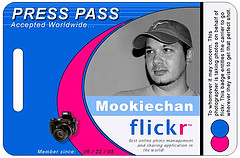
Do you live in an area that is likely to have civil unrest and protests? Perhaps having a Press Pass may get you out of trouble. ITS Tactical ran an article on just how to do this.
An excerpt:
An excerpt:
Protesting is About Attention!Use that to your advantage. Protesters love the press. It can be a relatively simple proposition to get a press pass that will get you through/past protests that completely block traffic. Afterwards, ask them for a letter stating you have written for them, etc.
Set up a blog using a free service like Blogger or WordPress.
Write an “About” page or article telling people that this blog is for covering local protests or demonstrations
Design your own press ID using a template (Here’s an example template). Don’t lie on the pass. It’s not necessary.
Print it on a solid plastic card. There are tons of companies that will do this for a few bucks. (Here are a few) I had mine printed locally for about $.80 each.
Throw the ID on a lanyard or in an ID armband and stash it in the glove compartment for whenever you may need it.
If you have to use it, present it with authority! It has never failed me, even under the scrutiny of armed soldiers at roadblocks.
Friday, September 21, 2012
Destroying Paper Documents
The folks over at ITS Tactical have an interesting article on securely disposing paper documents.
Here is an excerpt:
ITS Tactical also sells "Burn Bags" for important documents (or shreddings from documents) at a reasonable price, just like the kind you'd find at government agencies or in the movies.
Here is an excerpt:
Reconstruction
The reconstruction of sensitive documentation has been around as long as shredders have. According to a fantastic NY Time article that everyone should read, reconstruction was first brought to light during the 1979 US Embassy takeover in Tehran. The Iranians elicited the help of local carpet weavers to reconstruct sensitive documents, which were sold on the streets of Tehran as a testament to US imperialism.
Just know that with some time and even the help of computer programs like Unshredder, there isn’t much reassurance that your documents will stay shredded.
![]() |
| Document Burn Bag |
Thursday, September 20, 2012
Tuesday, September 11, 2012
Lock Kill
Do you have a house/door key lock that you no longer want somebody to have the ability to unlock, but you don't have time to change the locks? Maybe you're a landlord? Or maybe you have some hidden purpose, such as forcing door traffic to a different entry to the building?
LockKill has a solution: a specialty key designed to slip in, bypass tumblers long enough to get all the way set, and then sheer off in place, destroying the lock. It only takes a few seconds.
Warning: the only real way of bringing that lock back from the dead is to replace it.
Watch the review by ITS Tactical:
LockKill has a solution: a specialty key designed to slip in, bypass tumblers long enough to get all the way set, and then sheer off in place, destroying the lock. It only takes a few seconds.
Warning: the only real way of bringing that lock back from the dead is to replace it.
Watch the review by ITS Tactical:
Saturday, September 8, 2012
Cognitive Side Channels
A recent media buzz this week involves so-called "side channel" attacks or leakages of information from human brain to computer interfaces. Not a ubiquitous technology today, but quite possibly down the road.
Essentially the attacks follow the lines of showing a plugged-in subject a bank, in which case the subject's mind races down the neural paths for things like account numbers, PINs, maybe balances or recent expenditures, etc. And the mere thoughts picked up by the device can capture these otherwise private thoughts inside the subject's brain.
Sound scary? It is. The brain wasn't designed to keep information from itself. Count us out of the "early adopter program".
Reminds us of the time the Ghostbusters were told the worst thing they could think of would be their next enemy:
Essentially the attacks follow the lines of showing a plugged-in subject a bank, in which case the subject's mind races down the neural paths for things like account numbers, PINs, maybe balances or recent expenditures, etc. And the mere thoughts picked up by the device can capture these otherwise private thoughts inside the subject's brain.
Sound scary? It is. The brain wasn't designed to keep information from itself. Count us out of the "early adopter program".
Reminds us of the time the Ghostbusters were told the worst thing they could think of would be their next enemy:
Friday, August 24, 2012
Protecting Cars from Viruses
Reuters is running a story that should amuse any computer security professional: Experts hope to shield cars from computer viruses.
An excerpt:
When you look at the statistics, you are far more likely to get injured or die in a car accident than you are in nearly any other security risk you face in your daily life. Even with the vast skies being what they are, and the regulations on the airlines industry and their pilots, it's not possible to keep air travel 100% safe, though it's safer than driving (once you get past the TSA checkpoint).
Computerized, self-driving cars may improve (emphasis on "may") safety stats; however, not if their software landscape looks like anything else we operate with a CPU in it these days. There are agencies with an operating budget larger than the GDP of several nations that are terrified about the possibility of malware injected into things like military aircraft or missile guidance systems. Given that, how in the world is an automobile for ~$20K (which is at most 1% of the price tag of the military's concerns) ever going to be 100% free of malware? Simple: it won't be.
We can't keep malware out of critical infrastructure SCADA systems. There's no way we can keep it out of your mom's minivan.
An excerpt:
Intel's McAfee unit, which is best known for software that fights PC viruses, is one of a handful of firms that are looking to protect the dozens of tiny computers and electronic communications systems that are built into every modern car.
Our guess is that when cars get to the point that they drive themselves, those who understand how malware works-- and more important: how undeniably complicated modern software and its hardware architecture can be-- will start donning a pair of Converse Chuck Taylors and resemble a modern Luddite by driving themselves, a la Will Smith in I, Robot.
It's scary business. Security experts say that automakers have so far failed to adequately protect these systems, leaving them vulnerable to hacks by attackers looking to steal cars, eavesdrop on conversations, or even harm passengers by causing vehicles to crash.
When you look at the statistics, you are far more likely to get injured or die in a car accident than you are in nearly any other security risk you face in your daily life. Even with the vast skies being what they are, and the regulations on the airlines industry and their pilots, it's not possible to keep air travel 100% safe, though it's safer than driving (once you get past the TSA checkpoint).
Computerized, self-driving cars may improve (emphasis on "may") safety stats; however, not if their software landscape looks like anything else we operate with a CPU in it these days. There are agencies with an operating budget larger than the GDP of several nations that are terrified about the possibility of malware injected into things like military aircraft or missile guidance systems. Given that, how in the world is an automobile for ~$20K (which is at most 1% of the price tag of the military's concerns) ever going to be 100% free of malware? Simple: it won't be.
Toyota Motor Corp, the world's biggest automaker, said it was not aware of any hacking incidents on its cars.
"They're basically designed to change coding constantly. I won't say it's impossible to hack, but it's pretty close," said Toyota spokesman John Hanson. [emphasis ours]Oh, we've never heard that before...
Officials with Hyundai Motor Co, Nissan Motor Co and Volkswagen AG said they could not immediately comment on the issue.
Mums the word is a much smarter response to the press.
A spokesman for Honda Motor Co said that the Japanese automaker was studying the security of on-vehicle computer systems, but declined to discuss those efforts.
A spokesman for the U.S. Department of Homeland Security declined to comment when asked how seriously the agency considers the risk that hackers could launch attacks on vehicles or say whether DHS had learned of any such incidents.They probably declined to comment because they are working on exploits for these as well. Say it ain't so? Look no further than Stuxnet and Flame, of which the US Gov takes full authorship credits. It's the future of the "cyberwarfarestate".
We can't keep malware out of critical infrastructure SCADA systems. There's no way we can keep it out of your mom's minivan.
Subscribe to:
Comments (Atom)