Because you never know when you just might need to have this skill:
Showing posts with label DIY. Show all posts
Showing posts with label DIY. Show all posts
Saturday, October 13, 2012


Wednesday, September 26, 2012
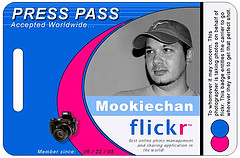
Avoiding Protests with a DIY Press Pass
Do you live in an area that is likely to have civil unrest and protests? Perhaps having a Press Pass may get you out of trouble. ITS Tactical ran an article on just how to do this.
An excerpt:
An excerpt:
Protesting is About Attention!Use that to your advantage. Protesters love the press. It can be a relatively simple proposition to get a press pass that will get you through/past protests that completely block traffic. Afterwards, ask them for a letter stating you have written for them, etc.
Set up a blog using a free service like Blogger or WordPress.
Write an “About” page or article telling people that this blog is for covering local protests or demonstrations
Design your own press ID using a template (Here’s an example template). Don’t lie on the pass. It’s not necessary.
Print it on a solid plastic card. There are tons of companies that will do this for a few bucks. (Here are a few) I had mine printed locally for about $.80 each.
Throw the ID on a lanyard or in an ID armband and stash it in the glove compartment for whenever you may need it.
If you have to use it, present it with authority! It has never failed me, even under the scrutiny of armed soldiers at roadblocks.
Friday, April 13, 2012
How To Send Digital Messages using HAM Radio
 This is a bit of a stretch from the normal topics, but in a severe disaster scenario (think Hurricane Katrina or third world country), it may be desired to send real time digital text communication when there is no communication infrastructure in place any longer (i.e. telephone lines are down and the Internet "tubes" were all clogged up).
Here is a clever, low budget way to accomplish digital text communication over significant distances with very inexpensive components, namely a HAM radio, a netbook, an open source software application called FLDIGI, and a low tech way of connecting them together.
A clever improvement to this might be to encrypt the text data before its transmitted, which should be possible using a variety of tools, possibly even GnuPG (if the transmission medium is reliable enough to send the complete block of encrypted text without drops).
Wednesday, February 29, 2012
DIY Drones
 Do It Yourself Surveillance Drone Aircraft. Why? Because you still can.
Adjust your one-liner: "if
An excerpt explains why:
It is extremely easy to build a drone now that can do not just surveillance but can carry rather large payloads. If you want to see how large some of these planes get, check out this video of a model Airbus A380. I don’t have to spell out the implications of this. I want to have my drone before the government makes them illegal. The US has been fighting such low-tech enemies lately that we haven’t thought through the nature of a world in which lots of people have sophisticated drones, not just other countries but private individuals. One somewhat worrying thing is that virtually all of this equipment comes from China or Taiwan.
Here's a flight video:
Friday, December 23, 2011
DIY Lock Pick Set

Here's another very interesting post on lock-picking, like making a padlock shim out of soda can: How to make your own lock-picking tools from a windshield wiper. Of course, the skills that come with it, plus the ethics of when it's acceptable to use it, are just as important (if not more).
After you've picked that up, try a copy of Practical Lock Picking: A Physical Penetration Tester's Training Guide or The Complete Book of Locks and Locksmithing.
Tuesday, December 20, 2011
How to Shim Open a Padlock On the Cheap
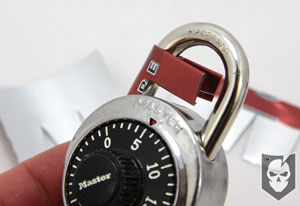 This is a quick, cheap, and simple way to crack open a padlock with a homemade shim from a soda can. Not a new idea, but a well-described set of instructions.
When Professor Matt Blaze published "Safecracking for the Computer Scientist", he received all sorts of negative feedback. There were things in his paper that were known vulnerabilities to all locksmiths for perhaps as long as a century, yet they were not fixed in future designs of locks. Publishing this info does not harm the public, since criminals already know how to do this. But publishing allows consumers of these lock products to be wiser. Master lock (depicted at right) has certainly known about this vulnerability for decades. It's been floating around the internet at least since the dot-com boom days.
Wednesday, August 13, 2008
Linux SSO to AD
This is a break from the traditional types of posts. It's more of an instructional howto, but I hope that it is valuable nonetheless.
...
Ah, the holy grail of Identity Management: Single Sign On. And in today's enterprise, that likely means Microsoft's Active Directory at the back end. While directions for bringing unix/linux boxes into the AD forest have been out there, they have been sticky at least, requiring random config changes to PAM, Kerberos, Samba, LDAP(S), etc.
Enter likewise-open, which is a great way to package all those up. It's a free software package that also comes with optional enterprise support, which anti-free-and-open-source companies tend to like.
Sure, there are tons of great examples out there that will tell you how to get likewise-open installed (which is a dream compared to the old days of manually configuring Kerberos, PAM, etc.). BUT, they leave you high and dry with any user in the whole domain (possibly the forest) being able to log into the computer, since they focus on "authentication" and not "authorization". Since when is that better than less passwords? They also don't properly show how to manage privileged access once logged in. So the following are some subtle configuration details and nuggets for which I have had to comb the web and anyone who really does enterprise SSO will appreciate.
This will assume you have likewise-open installed, which if you don't, on Ubuntu it's as simple as: sudo apt-get install likewise-open.
For that matter, this entire thing assumes Ubuntu, but would work elsewhere (paths may vary).
Joining to the domain is very easy, too: sudo domainjoin-cli join fully.qualified.domain.name UserID
Now, you probably want to limit who can log on to the shell to just admins. After all, it's Unix; it's not a toy. Use your favorite text editor (as root or sudo) and edit /etc/security/pam_lwidentity.conf. Uncomment this line require_membership_of and add an AD group containing those admins in the Domain\Group format.
Next you'll want to make sure those admins can use sudo otherwise you'll have a root password management problem (the whole point of SSO is to reduce the number of passwords to manage, right?). Edit the /etc/sudoers file by typing sudo visudo and add a line in this format: %DOMAIN\\Group ALL=(ALL) ALL (if you want to allow everything-- follow normal sudo permissions rules to restrict further).
Last, but not least, you'll probably want to get a psychological acceptance from administrators as a security design principle, right? In order to do that, let's get rid of that pesky Domain\UserID format and just use the UserID format. After all, who wants to type in ssh 'domain\userid'@computername when they can just type in ssh computername? This is the coup de grâce in favor of less passwords. Again, as root or sudo, edit /etc/samba/lwiauthd.conf and add winbind use default domain = yes to the end of the file. If you're in a multi-domain forest, you're up a creek (not to mention you probably have a less than simple environment anyway), and at a minimum your users in other domains will have to specify the domain\userid format. But users in the same domain can log in without the domain\ prefix.
One recipe for quick SSO to AD on Unix/Linux in a mere few minutes. Enjoy.
...
Ah, the holy grail of Identity Management: Single Sign On. And in today's enterprise, that likely means Microsoft's Active Directory at the back end. While directions for bringing unix/linux boxes into the AD forest have been out there, they have been sticky at least, requiring random config changes to PAM, Kerberos, Samba, LDAP(S), etc.
Enter likewise-open, which is a great way to package all those up. It's a free software package that also comes with optional enterprise support, which anti-free-and-open-source companies tend to like.
Sure, there are tons of great examples out there that will tell you how to get likewise-open installed (which is a dream compared to the old days of manually configuring Kerberos, PAM, etc.). BUT, they leave you high and dry with any user in the whole domain (possibly the forest) being able to log into the computer, since they focus on "authentication" and not "authorization". Since when is that better than less passwords? They also don't properly show how to manage privileged access once logged in. So the following are some subtle configuration details and nuggets for which I have had to comb the web and anyone who really does enterprise SSO will appreciate.
This will assume you have likewise-open installed, which if you don't, on Ubuntu it's as simple as: sudo apt-get install likewise-open.
For that matter, this entire thing assumes Ubuntu, but would work elsewhere (paths may vary).
Joining to the domain is very easy, too: sudo domainjoin-cli join fully.qualified.domain.name UserID
Now, you probably want to limit who can log on to the shell to just admins. After all, it's Unix; it's not a toy. Use your favorite text editor (as root or sudo) and edit /etc/security/pam_lwidentity.conf. Uncomment this line require_membership_of and add an AD group containing those admins in the Domain\Group format.
Next you'll want to make sure those admins can use sudo otherwise you'll have a root password management problem (the whole point of SSO is to reduce the number of passwords to manage, right?). Edit the /etc/sudoers file by typing sudo visudo and add a line in this format: %DOMAIN\\Group ALL=(ALL) ALL (if you want to allow everything-- follow normal sudo permissions rules to restrict further).
Last, but not least, you'll probably want to get a psychological acceptance from administrators as a security design principle, right? In order to do that, let's get rid of that pesky Domain\UserID format and just use the UserID format. After all, who wants to type in ssh 'domain\userid'@computername when they can just type in ssh computername? This is the coup de grâce in favor of less passwords. Again, as root or sudo, edit /etc/samba/lwiauthd.conf and add winbind use default domain = yes to the end of the file. If you're in a multi-domain forest, you're up a creek (not to mention you probably have a less than simple environment anyway), and at a minimum your users in other domains will have to specify the domain\userid format. But users in the same domain can log in without the domain\ prefix.
One recipe for quick SSO to AD on Unix/Linux in a mere few minutes. Enjoy.
Subscribe to:
Posts (Atom)